April 15, 2026 · 8 min read
Link in Bio Ideas for Girls: Cute, Aesthetic, and Easy to Build
Cute and aesthetic link in bio ideas for girls in 2026. Learn what to include, how to pick a vibe, and how to build a polished Instagram or TikTok bio link.
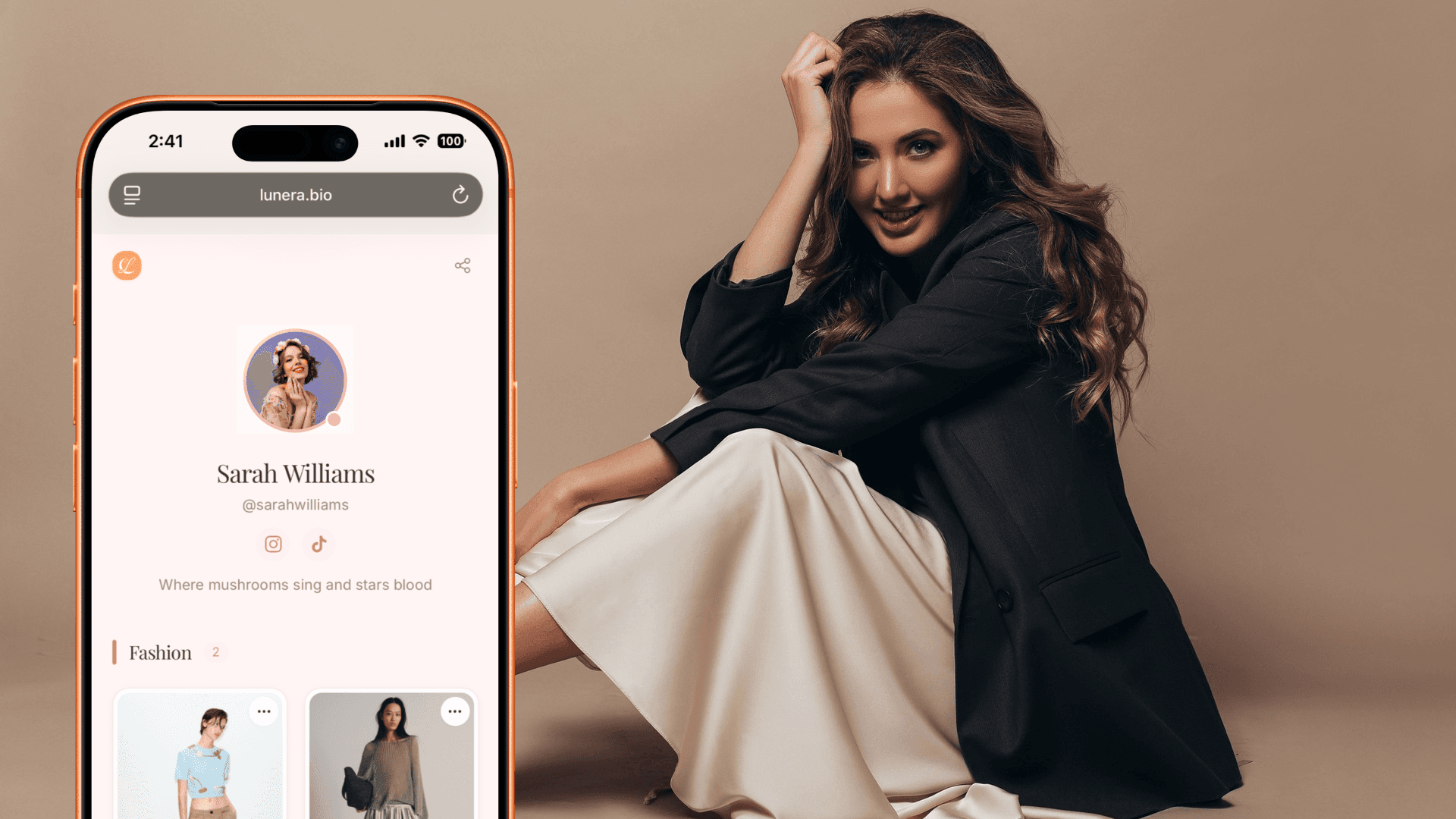
The best link in bio ideas for girls are not just pretty. They make your profile easier to explore. A good page helps followers shop your favorites, find your other socials, save your content, and understand your style in one tap.
If your Instagram or TikTok bio link feels like a random list of buttons, this guide will help you turn it into a small, aesthetic home page for your online world.
Start with the vibe
Before choosing a tool, decide what your page should feel like. The design should match the content people already see on your feed.
Popular aesthetic directions:
- Soft girl - blush, peach, cream, gentle serif headings.
- Clean girl - neutrals, white space, simple product cards.
- It-girl editorial - black, ivory, magazine-style contrast.
- Coquette - pink, bows, romantic details, playful type.
- Y2K - brighter color, glossy visuals, nostalgic styling.
- Minimal luxe - beige, espresso, gold, clean spacing.
Pick one direction and keep it consistent. A cute link in bio works best when the colors, photos, and wording feel like the same person made them.
What to put on an aesthetic link in bio
You do not need fifteen links. Start with the links followers actually ask for.
Good sections include:
- Shop my favorites - beauty, fashion, home, wellness, tech, books, or travel finds.
- Latest post links - the exact product, outfit, recipe, or routine from your newest video.
- Your own products - presets, templates, ebooks, courses, merch, or services.
- Social links - TikTok, Instagram, Pinterest, YouTube, X, or newsletter.
- Contact or collaboration - email, media kit, or brand inquiry form.
If you are just starting, choose three sections: latest finds, socials, and contact.
Aesthetic bio link examples
Beauty creator setup
- Top card: current routine or latest GRWM products.
- Category: skincare favorites.
- Category: makeup bag staples.
- Category: hair tools and accessories.
- Footer: TikTok, Instagram, YouTube, email.
Fashion creator setup
- Top card: outfit from your pinned video.
- Category: wardrobe basics.
- Category: seasonal edits.
- Category: shoes, bags, and jewelry.
- Footer: Pinterest, TikTok, Instagram, contact.
Lifestyle creator setup
- Top card: this week's favorite find.
- Category: home, coffee, desk, wellness.
- Category: books, playlists, or travel links.
- Category: newsletter or personal blog.
- Footer: all social handles.
How to build it in 10 minutes
- Pick a link-in-bio app with visual cards and themes.
- Add your profile photo, name, and a short bio.
- Choose a theme that matches your feed.
- Add your top five links first.
- Use real photos for product or content cards.
- Group links into two or three simple categories.
- Put social links near the bottom.
- Copy your page URL into Instagram, TikTok, and YouTube.
Do not wait until the page is perfect. A simple, current page beats a beautiful page full of old links.
Building an aesthetic link in bio with Lunera
Lunera is a free iOS app for creators who want their bio link to feel more like a curated page than a button list. It is helpful if you share products, outfits, beauty finds, home favorites, or affiliate recommendations.
With Lunera, you can:
- Add visual product cards with photos.
- Organize products into categories like beauty, wardrobe, home, and favorites.
- Use 4 free themes, with more editorial themes available on Pro.
- Share your page at
lnr.bio/yourname. - Track basic clicks and upgrade for more analytics tools.
The result is a page that looks intentional even if you are building it from your phone between posts.
Mistakes that make a bio link feel messy
- Too many links at once. Keep the first screen focused.
- No visual hierarchy. Your most important link should not look the same as everything else.
- Old campaign links. Remove expired sales, broken products, and outdated collabs.
- Photos that do not match your feed. Use images that feel like your actual content.
- No contact path. If you want brand deals, make collaboration easy.
FAQ: aesthetic link in bio ideas
What is the best link in bio app for girls?
The best app depends on what you share. If your page is product-driven and you want visual cards, categories, themes, and a mobile setup, Lunera is a strong option for iOS creators.
How do I make my link in bio aesthetic?
Choose one visual direction, use consistent photos, keep your top links organized, and avoid turning the page into a long list of unrelated buttons.
What should I put in my Instagram bio link?
Put your latest links, product favorites, other social profiles, contact information, and anything you sell or want followers to save.
How many links should I add?
Start with five to ten. If you need more, use categories so followers can browse without feeling overwhelmed.
Your bio link should feel like the cover of your profile, not the junk drawer. Make it pretty, but make it useful first.